# Defining the deployment process in Octopus
[Getting Started - Deployment Process](https://www.youtube.com/watch?v=0oWRg_TxWxM)
The deployment process is the steps the Octopus Server orchestrates to deploy your software. For our simple hello world script, we will only have one step.
:::figure
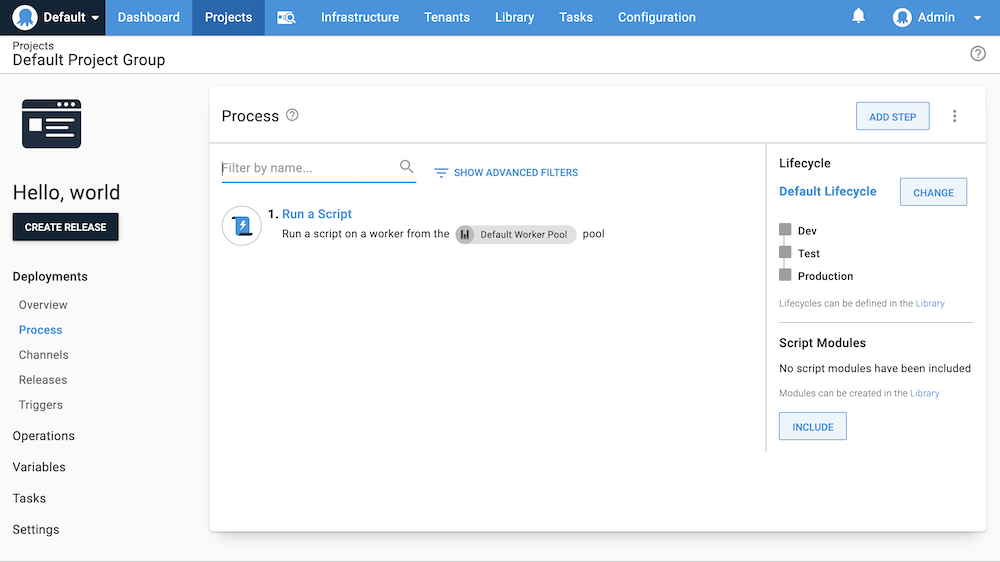
:::
1. From the *Hello world* project you created on the previous page, click **DEFINE YOUR DEPLOYMENT PROCESS**.
1. Click **ADD STEP**.
1. Select the **Script** tile to filter the types of steps.
1. Scroll down and click **ADD** on the **Run a Script** tile.
1. Accept the default name for the script and leave the **Enabled** check-box ticked.
1. In the **Execution Location** section, select **Run once on a worker** (if you are on self-hosted Octopus, select **Run once on the Octopus Server**). If you are using Octopus Cloud and want to use Bash scripts change the worker pool from **Default Worker Pool** to **Hosted Ubuntu**.
1. Scroll down to the **Script**, select your script language of choice, and enter the following script in the **Inline Source Code** section:
PowerShell
```powershell
Write-Host "Hello, World!"
```
Bash
```bash
echo "Hello, World!"
```
:::div{.hint}
If you are using Octopus Cloud, Bash scripts require you to select the **Hosted Ubuntu** worker pool. The **Default Worker Pool** is running Windows and doesn't have Bash installed.
:::
8. Click **SAVE**.
The next step will [create a release and deploy it](/docs/getting-started/first-deployment/legacy-guide/2022/create-and-deploy-a-release).
**Further Reading**
For further reading on defining a deployment process in Octopus Deploy please see:
- [Deployment Process Documentation](/docs/projects/deployment-process)
- [Deployment Documentation](/docs/deployments)
- [Patterns and Practices](/docs/deployments/patterns)